![Logo (blanc)-1.png]](https://help.bowo.fr/hs-fs/hubfs/Logo%20(blanc)-1.png?height=42&name=Logo%20(blanc)-1.png)
As shown in this example, before validating their cart, the guest has the option to write a message to your operational team.
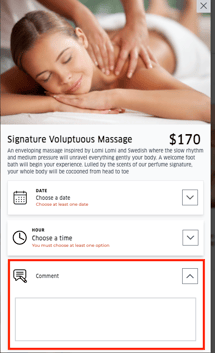

To enable comments, log in to the Bowo back office and follow these steps:
-
Go to the "Web App" tab, then click on "Editable pages".
-
Select the booking page you want to modify.
-
Click "Edit".
-
Check the box “Allow comments” in the "Required guest information to order" section.
⚠️ Please note: don’t forget to save your changes at the top of the page.